
Thanks for considering using Zelle to pay for an annual Madison Academic Staff Network membership! This is one of two online ways we offer to pay for annual memberships, the other being Square. Square is based around Credit or Debit Cards, but Zelle is based around standard ACH transfers – which means it is free to use and has no transaction fees!
Step one is checking to see if your bank works with Zelle. Here is a list of supported banks in the Zelle network. Is your bank on it? If so, please proceed to the next step. If not, please click back in your browser and choose Square or pay by check.
Sign into your bank’s website or mobile app, and look for the Zelle option. Note that all banks are different, which means their ‘portal’ to use Zelle might look different.
We’ll use the UW Credit Union as our example below as we’re based in Madison.
Zelle will ask you if you want to search for a recipient by Name or by Email Address – you can search for us under either our registered name:
Madison Academic Staff Network
or our email address:
wisconsinmasn@mailplus.wisc.edu
You might see a screen like the following:
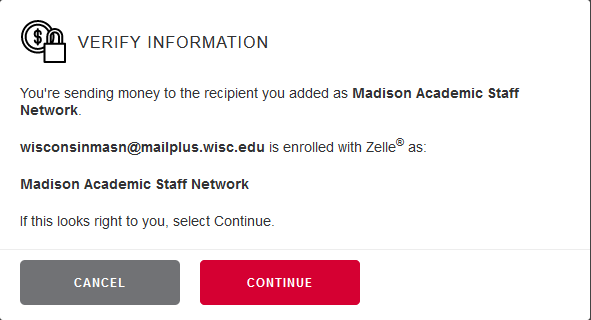
Click through the boxes until it comes to the amount you’d like to send – the dues for a “MASN Year” (September 1 through August 31; you get the most value by purchasing a membership at the beginning of each year) are $15 (Fifteen Dollars).
Some Zelle Banks will offer a “Reason” field, some will not. If you get a “Reason” or “Memo” (etc) field to type in, please put in your email address and “membership year-year” for instance, “membership 2023-2024” – this is optional but it will greatly help us add you to our membership roster!
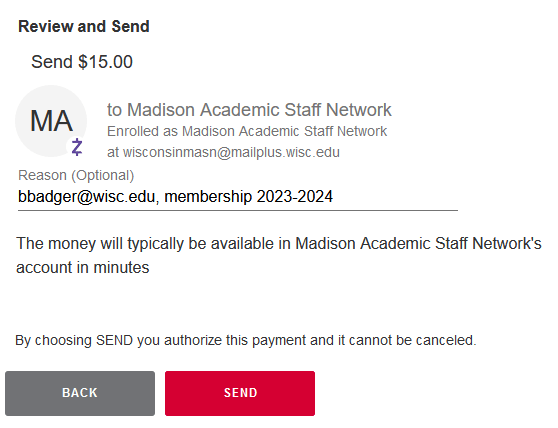
And that’s it! Fees are usually deducted within minutes, we will receive an email notifying us that you’ve joined, and we will send you a welcome email. We look forward to seeing you at our events!
 Madison Academic Staff Network